Viewing reports on tasks
Who can do it: Service provider, Customer
Where: Wialon Platform FleetSpace
Reports on tasks provide detailed data on events that require special attention, such as SOS signals or unauthorized movements, to help users manage critical events effectively.
Generating the report
To generate a report on tasks, follow these steps:
- In Wialon Platform FleetSpace, navigate to the Reports page.
- Select the Tasks report type. The settings selected for this report will be saved for this session.
- Configure the report parameters:
- Select the required date range.
- In the Grouped by field, select whether to group the results by drivers, devices, or assignees.
- Select the specific items (drivers, devices, or assignees) to include in the report.
- Select the task statuses to include in the report.
- The report is generated automatically. If needed, you can download the report in CSV format by clicking the icon
 . You can navigate to other pages and return to your report. The generated report is available for one minute.
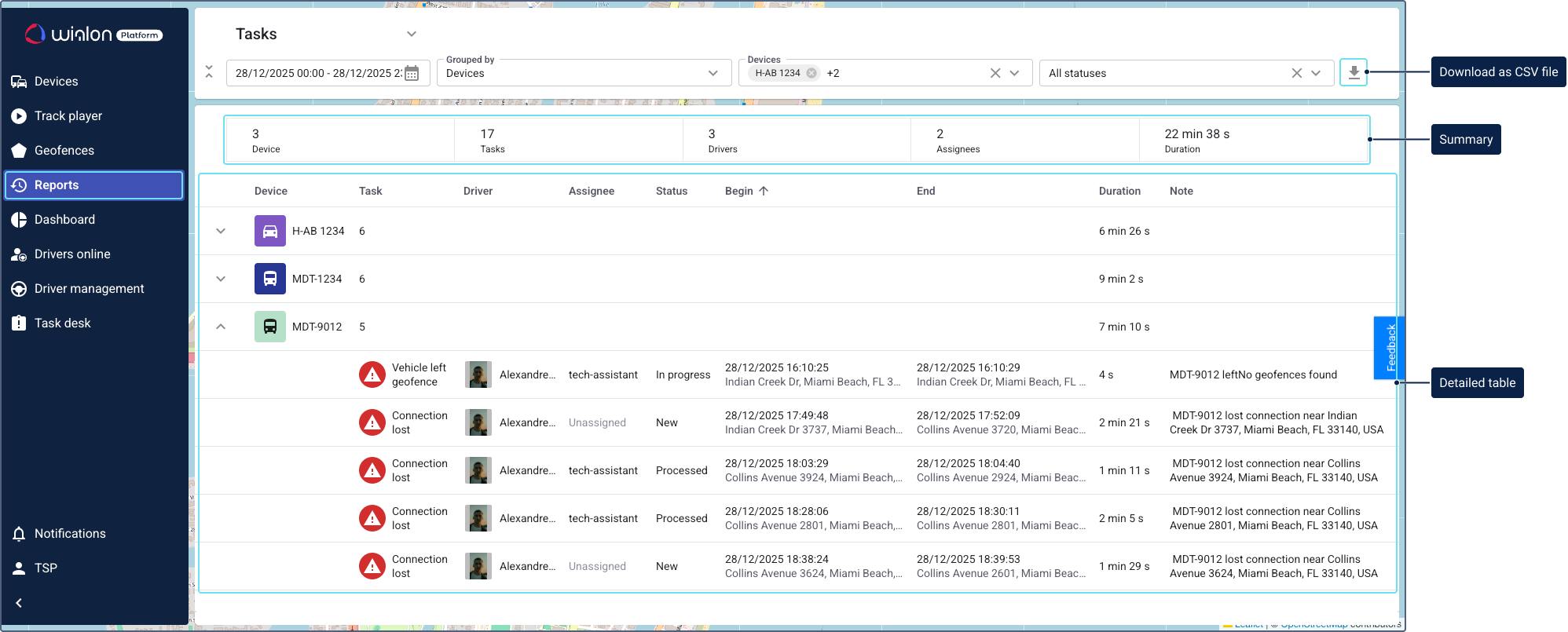
Report results
The report is organized into two sections: a summary at the top and a detailed table below.
Summary
The summary section provides the following key statistics:
- Number of devices
- Total number of tasks
- Number of drivers
- Number of assignees
- Total duration of events
Detailed report table
The detailed table provides the following information, grouped by the option you selected (drivers, devices, or assignees):
- Number of created tasks
- Task name
- Driver name
- Assignee name
- Task status
- Beginning and end time and date
- Location of the unit at the beginning and end of the event
- Duration of the event
- Note